Scratch has become one of the most widely recommended programming tools for children in North America and Europe, often serving as a first introduction to coding in schools, after-school programs, and homes. If you’ve been hearing about Scratch from teachers, other parents, or even your own child, you might be wondering: what exactly is it, and why has it gained such massive popularity?
This guide provides a detailed, practical, and experience-based explanation designed specifically for parents in Western education contexts. It draws on real classroom scenarios, educational research trends, and actual student outcomes to give you a clear understanding of how Scratch works and why it continues to dominate the world of kids’ coding education.
Understanding What Scratch Is
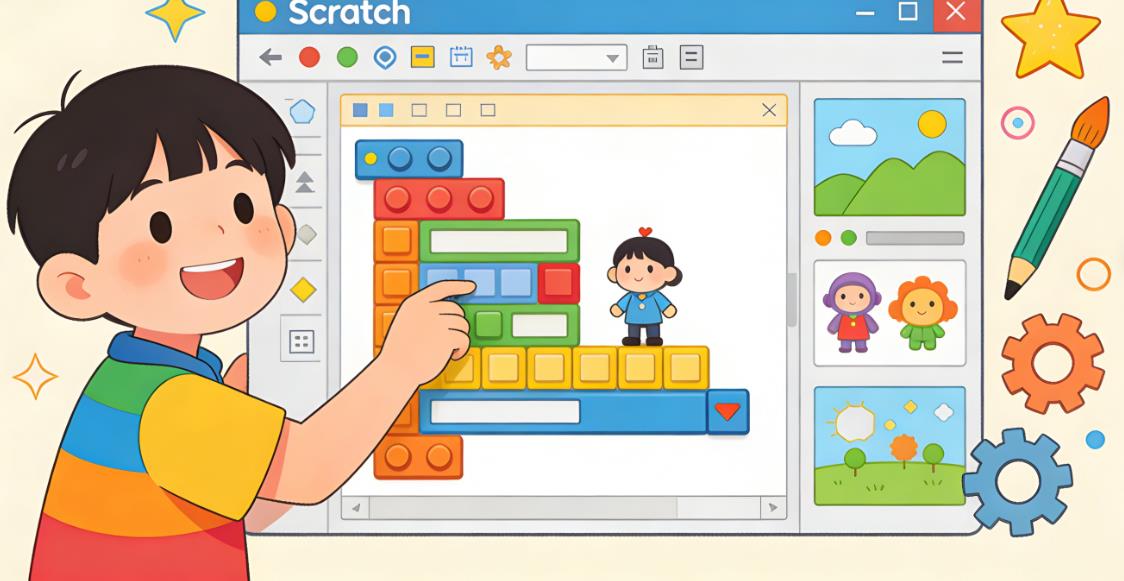
Scratch is a visual programming language designed for children, typically ages 6 to 16, although it’s also used by beginners of all ages. Instead of typing code, children build programs by dragging and snapping together colorful blocks that represent coding instructions. These blocks control characters (called sprites), backgrounds, sounds, and interactions.
Scratch was developed by the MIT Media Lab as part of a broader initiative to make programming accessible, creative, and engaging. The key idea behind Scratch is that coding should feel less like writing instructions and more like building with LEGO bricks. This design philosophy removes many of the barriers that make traditional programming intimidating, such as syntax errors or complex rules.
For example, instead of writing a line like:
move 10 steps
A child simply drags a “move 10 steps” block into place. The logic is still there, but the frustration is minimized.
What makes Scratch particularly powerful is that it’s not just a coding tool—it’s a creative platform. Kids can build animations, games, interactive stories, quizzes, and even simple simulations.
How Scratch Works in Practice
When a child opens Scratch, they see a stage area where their project runs, a palette of coding blocks, and a workspace where they assemble scripts. Each sprite can have its own code, allowing for multi-character interactions.
A simple project might involve:
A cat sprite that moves when you press arrow keys
A background that changes during gameplay
Sound effects when certain actions occur
More advanced projects can include:
Score tracking systems
Physics-like movement
Multiple levels in a game
Interactive storytelling with branching decisions
This layered complexity is one of the reasons Scratch is so effective—it grows with the child.
Why Scratch Is So Popular Among Kids
Ease of Entry Without Sacrificing Depth
One of the biggest reasons Scratch is popular is that it removes the steep learning curve typically associated with coding. Children can start creating something meaningful within minutes.
In many classrooms across the United States and the UK, teachers report that students can build their first animation within a single lesson. This immediate sense of achievement is critical—it builds confidence and keeps kids engaged.
At the same time, Scratch is not “too simple.” Advanced users can create surprisingly complex projects. Some middle school students have built full-fledged games with scoring systems, menus, and even basic AI behaviors.
This balance between simplicity and depth is rare in educational tools.
A Strong Focus on Creativity
Unlike many coding platforms that focus purely on logic or problem-solving, Scratch emphasizes creativity. Kids are encouraged to tell stories, design characters, and express ideas.
In a real classroom example from a California elementary school, students were asked to create a “digital story about friendship.” Instead of writing essays, they built interactive narratives in Scratch. Some added voice recordings, others included branching storylines where choices affected outcomes.
This approach transforms coding from a technical task into a form of self-expression.
For many children—especially those who are not naturally drawn to math or logic—this creative angle makes a huge difference.
Immediate Visual Feedback
Scratch provides instant visual results. When a child runs their code, they immediately see what happens.
If something doesn’t work, they can quickly adjust and try again. This rapid feedback loop is essential for learning because it reinforces experimentation and problem-solving.
In contrast, traditional programming often requires multiple steps before seeing any output, which can be discouraging for beginners.
Community and Sharing
Another major factor behind Scratch’s popularity is its online community. Kids can publish their projects, explore what others have made, and even remix existing projects.
This creates a social learning environment that feels similar to platforms like YouTube or TikTok—but focused on creativity and education.
For example, a 10-year-old student in London created a simple maze game and shared it online. Within a week, other kids had remixed the game by adding new levels, characters, and challenges. The original creator could see how others improved their idea, which inspired them to iterate further.
This kind of collaborative creativity is incredibly motivating.
No Cost and Easy Access
Scratch is completely free and runs in a web browser. There’s no need for expensive software or high-end devices.
This accessibility is especially important in Western education systems where schools often operate under tight budgets. Teachers can introduce Scratch without worrying about licensing costs.
It also means parents can support their child’s learning at home without additional expenses.
Educational Benefits of Scratch
Development of Computational Thinking
Scratch teaches core programming concepts such as:
Sequencing (ordering instructions)
Loops (repeating actions)
Conditionals (if-then logic)
Variables (storing data)
Events (responding to user input)
These concepts form the foundation of all programming languages, including Python, JavaScript, and Java.
More importantly, Scratch develops computational thinking—the ability to break problems into smaller parts, recognize patterns, and design solutions.
This skill is increasingly recognized as essential not just in tech careers, but across many fields.
Encouraging Problem-Solving and Persistence
Coding in Scratch naturally involves trial and error. Kids learn that mistakes are part of the process.
In one real case from a coding club in New York, a student spent over an hour trying to fix a bug where their character wouldn’t jump correctly. Instead of giving up, they experimented with different blocks, adjusted timing, and eventually solved the issue.
This kind of persistence is a valuable life skill.
Improving Logical and Mathematical Thinking
Although Scratch is creative, it also reinforces logical reasoning. Kids learn cause-and-effect relationships and begin to understand how systems work.
For example, creating a scoring system in a game requires understanding variables and conditions. Timing animations involves basic math concepts.
This integration of logic and creativity makes learning more holistic.
Boosting Confidence and Ownership
When kids create something in Scratch, they feel a sense of ownership. It’s their project, their idea, their design.
This is very different from traditional assignments where there’s often a “right answer.” In Scratch, there are many possible outcomes, which encourages originality.
Teachers often observe that students who struggle in traditional subjects become more engaged and confident when working with Scratch.
Real-World Classroom Examples
Elementary School Integration
In many U.S. elementary schools, Scratch is introduced as early as third grade. A common project is creating an interactive quiz.
Students design questions, add multiple-choice answers, and program feedback for correct or incorrect responses. This not only teaches coding but also reinforces subject knowledge.
Middle School Game Design Projects
In UK secondary schools, Scratch is often used for game design units. Students learn about game mechanics, user experience, and storytelling.
One student created a platformer game where the character had to avoid obstacles and collect coins. They implemented gravity, collision detection, and a scoring system—all within Scratch.
This kind of project introduces concepts that are directly transferable to more advanced programming.
After-School Coding Clubs
In after-school programs across Canada and Australia, Scratch is a popular choice because it accommodates mixed skill levels.
Beginners can create simple animations, while more experienced students work on complex games. This flexibility makes it ideal for group settings.
Common Misconceptions About Scratch
Scratch Is Only for Very Young Kids
While Scratch is beginner-friendly, it’s not limited to young children. Many older students use it to prototype ideas or learn programming concepts before moving on to text-based languages.
Some high school students even use Scratch to explore game design principles.
Scratch Is Not “Real Coding”
This is a common misconception. Scratch teaches the same logical structures used in professional programming.
The main difference is the interface. Instead of typing code, students use visual blocks. The underlying thinking process remains the same.
In fact, many educators argue that starting with Scratch leads to a deeper understanding of programming fundamentals.
Scratch Has Limited Applications
While Scratch is not designed for building commercial software, its educational value is immense. It provides a strong foundation that can be applied to other languages and tools.
Many students who start with Scratch go on to learn Python, JavaScript, or robotics with greater ease.
Transitioning from Scratch to Other Languages
One of the key advantages of Scratch is how well it prepares students for more advanced programming.
After learning Scratch, many kids transition to:
Python for general programming
JavaScript for web development
Robotics platforms like LEGO Mindstorms or Arduino
Because they already understand concepts like loops and conditionals, the transition is much smoother.
For example, a student who learned Scratch in elementary school may find it easier to grasp Python in middle school because the logic is familiar—they just need to learn the syntax.
How Parents Can Support Their Child
Encourage Exploration Rather Than Perfection
Let your child experiment and make mistakes. The goal is learning, not creating a perfect project.
Ask Open-Ended Questions
Instead of giving instructions, ask questions like:
“What do you want your character to do next?”
“How could you make this more interactive?”
This encourages independent thinking.
Celebrate Creativity
Focus on what your child creates, not just how well it works. Creativity is a key part of coding in Scratch.
Engage With Their Projects
Ask your child to show you their work. Even if you don’t understand coding, showing interest can be very motivating.
Why Scratch Continues to Thrive in Western Education
Alignment With Modern Education Goals
Scratch aligns well with current educational priorities in the U.S., UK, and other Western countries, including:
STEM education
Digital literacy
Creative problem-solving
Project-based learning
Its versatility makes it suitable for both formal education and informal learning environments.
Support From Educators and Institutions
Scratch is widely supported by teachers, schools, and educational organizations. There are extensive teaching resources, lesson plans, and communities that make it easy to implement.
Adaptability to Different Learning Styles
Scratch works well for visual learners, creative thinkers, and analytical students alike. This inclusivity is a major reason for its widespread adoption.
Scratch is more than just a beginner coding tool—it’s a gateway into the world of computational thinking, creativity, and problem-solving. Its popularity among children in Western countries is not accidental; it’s the result of thoughtful design, strong educational value, and a supportive global community.
For parents, Scratch offers a low-risk, high-reward way to introduce children to coding. It doesn’t require prior knowledge, it’s free to use, and it provides immediate, engaging results.
Most importantly, it helps children develop skills that go far beyond programming—skills that will be valuable in school, future careers, and everyday life.
If you’re considering whether Scratch is a good starting point for your child, the answer is overwhelmingly yes.

Leave a Reply