Learning how to program can feel challenging for children, especially when they see long lines of code and unfamiliar words on the screen. However, programming does not have to be difficult or boring. In fact, one of the best ways for children to learn coding is by building simple games.
In this tutorial, we will create a Number Guessing Game using Python. This mini game is a classic beginner project that helps young learners understand basic programming concepts while having fun at the same time.
This article is designed for:
- Children who are new to Python
- Parents who want to support their children’s coding journey
- Teachers who are looking for beginner-friendly teaching material
By the end of this tutorial, learners will:
- Understand how a computer makes decisions
- Learn how to use variables, input, and loops in Python
- Build a complete and playable game on their own
- Gain confidence and motivation to continue learning programming
No previous programming experience is required. If you can read simple English and follow instructions step by step, you are ready to begin.
What Is a Number Guessing Game?
Before we start writing any code, let’s understand the game itself.
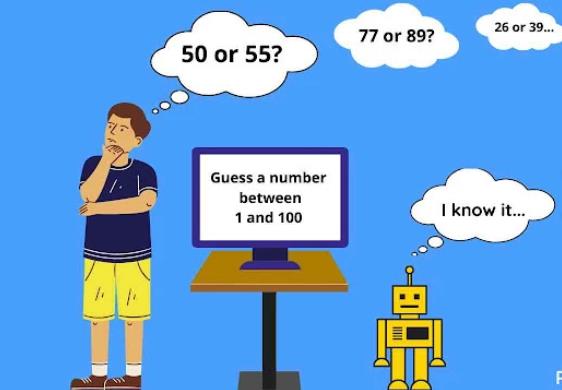
A Number Guessing Game works like this:
- The computer secretly chooses a random number.
- The player tries to guess the number.
- The computer tells the player if the guess is:
- Too high
- Too low
- Correct
- The player keeps guessing until the correct number is found.
This simple idea is perfect for beginners because it uses:
- Logical thinking
- Repetition
- Decision making
All of these are important skills in programming.
Why This Game Is Perfect for Young Beginners
The Number Guessing Game is often one of the first projects taught in programming classes, and for good reasons.
1. Simple Rules
The game rules are easy to understand, even for young children. There are no complex instructions or confusing gameplay mechanics.
2. Clear Learning Goals
This game teaches important programming concepts such as:
- How to get input from the user
- How to compare numbers
- How to repeat actions using loops
3. Instant Feedback
Children can see the result of their code immediately. This makes learning more exciting and rewarding.
4. Easy to Improve
Once the basic game works, it can be improved in many ways. This encourages creativity and experimentation.
What You Will Learn in This Tutorial
In this project, we will learn the following Python concepts:
- Variables – to store numbers and guesses
- The
input()function – to get guesses from the player - The
int()function – to convert text into numbers - Conditional statements (
if,elif,else) – to compare guesses - Loops (
while) – to allow repeated guessing - The
randommodule – to generate a secret number
Each concept will be explained in simple language before it is used.
Getting Ready to Code
What You Need
To follow this tutorial, you will need:
- A computer (Windows, macOS, or Linux)
- Python installed (Python 3 recommended)
- A code editor (such as IDLE, VS Code, or Thonny)
If you are a beginner, Thonny is a great choice because it is simple and designed for learning.
Step 1: Understanding Random Numbers
In our game, the computer needs to choose a secret number. We do not want the same number every time, so we will use random numbers.
Python has a built-in tool called a module. A module is like a toolbox that contains useful functions.
The module we need is called random.
Importing the Random Module
Before we can use it, we must import it.
import random
This line tells Python:
“I want to use tools from the random module.”
Step 2: Creating the Secret Number
Now we will ask the computer to choose a random number.
Using randint()
The randint() function gives us a random integer between two numbers.
secret_number = random.randint(1, 10)
This means:
- The secret number will be between 1 and 10
- The number is saved in a variable called
secret_number
What Is a Variable?
A variable is like a box that stores information.
In this case, the box stores a number.
You can think of it like this:
secret_number = the number the computer wants you to guess
Step 3: Asking the Player for a Guess
Next, we want the player to guess the number.
Using input()
The input() function lets the program ask the user a question.
guess = input("Guess a number between 1 and 10: ")
This will:
- Show a message on the screen
- Wait for the player to type something
- Save the result in the variable
guess
Important: Input Is Text
Even if the player types a number, Python sees it as text, not a number.
That is why we need to convert it.
Step 4: Converting Text to a Number
To turn text into a number, we use the int() function.
guess = int(guess)
Now Python understands that guess is a number, and we can compare it with the secret number.
Step 5: Comparing the Guess
Now comes an important part: decision making.
The computer needs to check:
- Is the guess too high?
- Is the guess too low?
- Is the guess correct?
Using if, elif, and else
if guess > secret_number:
    print("Too high!")
elif guess < secret_number:
    print("Too low!")
else:
    print("Correct!")
This code teaches the computer how to make decisions.
How This Works
ifchecks the first conditionelifchecks another conditionelseruns if none of the above are true
Only one of these blocks will run.
Step 6: Letting the Player Guess Again
Right now, the player can only guess once. That is not much fun.
We want the game to continue until the correct number is guessed.
To do this, we use a loop.
Step 7: Understanding Loops
A loop allows the program to repeat actions.
In this game, we want to:
- Keep asking for guesses
- Stop only when the guess is correct
Using a while Loop
A while loop repeats as long as a condition is true.
while guess != secret_number:
    ...
This means:
“Keep running the code inside the loop while the guess is not correct.”
Step 8: Putting the Game Together
Now let’s combine everything step by step.
Full Game Code
import random

secret_number = random.randint(1, 10)
guess = None

while guess != secret_number:
    guess = int(input("Guess a number between 1 and 10: "))

    if guess > secret_number:
        print("Too high!")
    elif guess < secret_number:
        print("Too low!")
    else:
        print("Congratulations! You guessed the number!")
Understanding the Complete Program
Let’s review what the program does from start to finish.
- Import the random module
- Generate a secret number
- Ask the player to guess
- Compare the guess with the secret number
- Give feedback
- Repeat until the guess is correct
Even though the program looks longer now, every part was learned step by step.
Common Mistakes and How to Fix Them
Learning to code means making mistakes. That is normal and expected.
Mistake 1: Forgetting int()
If you forget to convert input to an integer, Python will show an error.
Solution: Always use int(input()) when working with numbers.
Mistake 2: Indentation Errors
Python uses indentation to understand code blocks.
Solution: Make sure your code lines are aligned correctly.
Mistake 3: Guessing Outside the Range
The game does not stop players from guessing numbers outside 1–10.
This is okay for beginners, but it can be improved later.
Understanding the Complete Program
Let’s review what the program does from start to finish.
- Import the random module
- Generate a secret number
- Ask the player to guess
- Compare the guess with the secret number
- Give feedback
- Repeat until the guess is correct
Even though the program looks longer now, every part was learned step by step.
Common Mistakes and How to Fix Them
Learning to code means making mistakes. That is normal and expected.
Mistake 1: Forgetting int()
If you forget to convert input to an integer, Python will show an error.
Solution: Always use int(input()) when working with numbers.
Mistake 2: Indentation Errors
Python uses indentation to understand code blocks.
Solution: Make sure your code lines are aligned correctly.
Mistake 3: Guessing Outside the Range
The game does not stop players from guessing numbers outside 1–10.
This is okay for beginners, but it can be improved later.
Making the Game More Fun (Optional Challenges)
Once the basic game works, learners can try improving it.
Challenge 1: Count the Number of Attempts
Add a variable to count how many guesses the player makes.
Challenge 2: Change the Number Range
Let the player choose the maximum number.
Challenge 3: Limit the Number of Guesses
Add a maximum number of tries to make the game more exciting.
Challenge 4: Play Again Option
Ask the player if they want to play another round.
These challenges help children practice problem-solving and creativity.
Why Game Projects Are Great for Learning Programming
Games are powerful learning tools, especially for children.
When children build games, they:
- Stay motivated
- Learn logical thinking
- Practice reading and understanding code
- Gain confidence through success
Small projects like this number guessing game can become the foundation for more advanced programming skills in the future.
Tips for Parents and Teachers
- Encourage children to experiment
- Let them make mistakes and learn from them
- Ask them to explain how the code works
- Celebrate small successes
Programming is not about writing perfect code. It is about learning how to think.
In this tutorial, we built a complete Number Guessing Game using Python. Along the way, we learned about variables, input, conditions, loops, and random numbers.
This project shows that programming does not have to be complicated. With simple ideas and clear steps, children can create real, working programs.
Most importantly, this game helps young learners discover that coding can be fun, creative, and rewarding.
If this is your first Python project—congratulations!
You have taken an important step into the world of programming.

Leave a Reply